Connect an agent
An AI agent works with Ntasks through the MCP endpoint, /api/mcp. Setting an agent up takes two steps, and the setup command does both:
- Register the server with the agent's MCP client. On first use the client signs in with OAuth: Ntasks opens in your browser, and you allow the agent and choose the projects it may reach (How an AI agent connects).
- Install the Ntasks skill,
skills/ntasks/SKILL.md. It gives the agent standing rules: Ntasks is the only list of open work, work the agent finds becomes a task, andget_task_guideholds the rest.
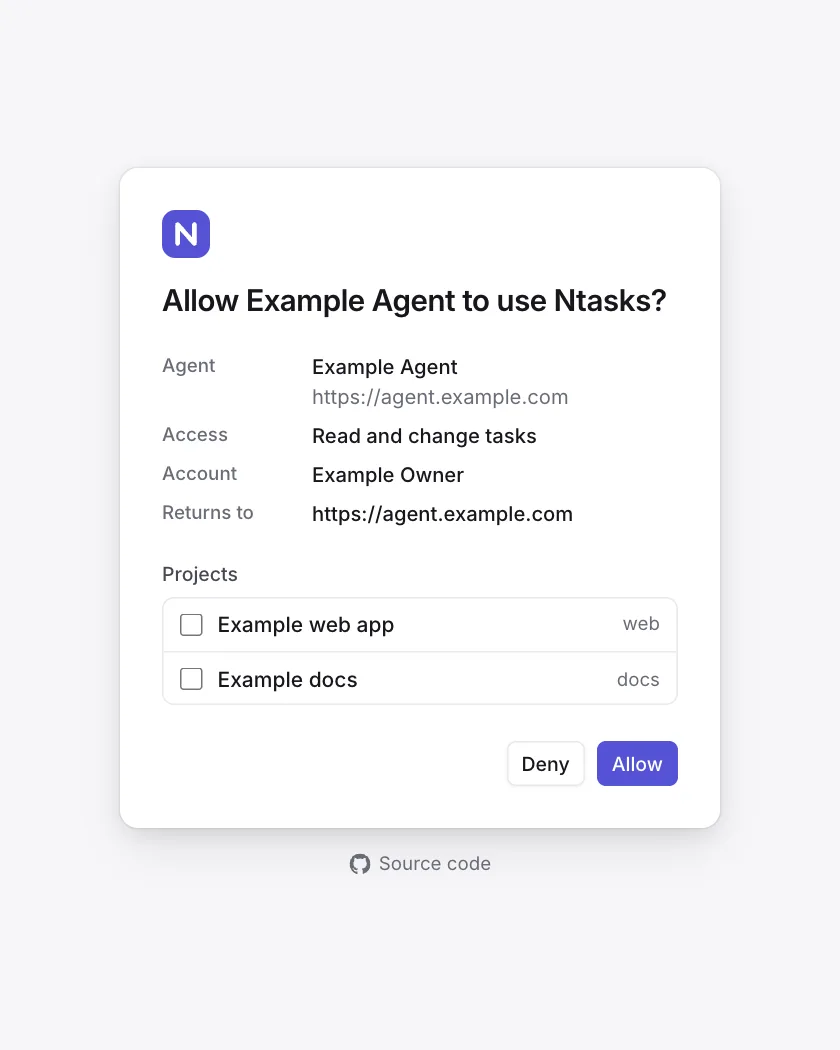
When an agent connects, the server sends its instructions, and get_task_guide returns the full guide; the agent reads them while it makes task calls. The skill makes it file what it finds in Ntasks in every session, including sessions where it is doing something else.
Set up with one command
Run this on each machine your agents use:
curl -fsSL https://raw.githubusercontent.com/notice-cx/Ntasks/main/install.sh | bash- asks for your Ntasks address;
- lists the supported agents it finds on the machine and asks which to set up;
- shows what it will change, and asks before changing anything;
- for each agent, registers an MCP server named
ntasksat<address>/api/mcpfor every project, and writes the skill file.
It needs no sudo.
| Agent | It registers the server with | It writes the skill to | Sign-in step it prints |
|---|---|---|---|
| Claude Code | claude mcp add --transport http --scope user ntasks <endpoint> | ~/.claude/skills/ntasks/SKILL.md | claude mcp login ntasks, or /mcp in a session |
| OpenAI Codex CLI | codex mcp add ntasks --url <endpoint> | ~/.agents/skills/ntasks/SKILL.md | codex mcp login ntasks |
| Gemini CLI | gemini mcp add --transport http --scope user ntasks <endpoint> | ~/.agents/skills/ntasks/SKILL.md | /mcp auth ntasks in a session |
Codex and Gemini CLI both read skills from ~/.agents/skills, so they share one copy.
Running it again
Run it again at any time:
- A server already registered as
ntasksat the same endpoint is left as it is. - One registered at another address, or as a local command, is replaced only after you agree.
- A skill file that differs from the repository's is replaced.
The address is the deployment's origin, such as https://ntasks.example.com. An address without a scheme gets https://; http:// is accepted only for localhost and 127.0.0.1.
Running it without prompts
These options answer its questions:
| Option | Environment variable | Effect |
|---|---|---|
--url <address> | NTASKS_URL | The Ntasks address |
--agents <list> | NTASKS_AGENTS | The agents to set up, separated by commas: claude, codex, gemini |
--yes | NTASKS_YES=1 | Makes the changes without asking, including replacing an ntasks server registered at another address or as a local command. Without it and without a terminal, the script stops at its first question and changes nothing |
NTASKS_REF | The branch or tag of this repository the skill is downloaded from. Default main | |
NTASKS_SKILL_SOURCE | Another URL or a local file to read the skill from |
curl -fsSL https://raw.githubusercontent.com/notice-cx/Ntasks/main/install.sh \
  | bash -s -- --url https://ntasks.example.com --agents claude,codex --yes
The script supports an agent only when its MCP command and its user skills folder are documented by its maker. Other agents connect by hand, below.
Set up by hand
Replace <your address> with the deployment's address. Each command registers the server for every project on the machine.
Claude Code
claude mcp add --transport http --scope user ntasks https://<your address>/api/mcp
claude mcp login ntasks
claude mcp login signs in from the shell; /mcp in a Claude Code session does the same. Copy skills/ntasks to ~/.claude/skills/ntasks. Sources: MCP, skills.
OpenAI Codex CLI
codex mcp add ntasks --url https://<your address>/api/mcp
codex mcp login ntasks
Codex keeps the server in ~/.codex/config.toml, which the Codex IDE extension also reads:
[mcp_servers.ntasks]
url = "https://<your address>/api/mcp"
Codex registers itself with Ntasks through dynamic client registration, so it needs no client id. Copy skills/ntasks to ~/.agents/skills/ntasks. Sources: MCP, skills.
Gemini CLI
gemini mcp add --transport http --scope user ntasks https://<your address>/api/mcpSign in with /mcp auth ntasks in a Gemini CLI session. Copy skills/ntasks to ~/.agents/skills/ntasks. Sources: MCP, skills.
Any other MCP client
| Setting | Value |
|---|---|
| Endpoint | https://<your address>/api/mcp |
| Transport | Streamable HTTP |
| Sign-in | OAuth 2.1 with PKCE. The client finds the authorization server from /.well-known/oauth-protected-resource/api/mcp and registers itself (dynamic client registration, RFC 7591); no client id is needed |
Name the server ntasks: the skill refers to its tools by that name.
The skill
skills/ntasks/SKILL.md is the one copy of the standing rules, in the Agent Skills format. Its description tells the agent to load it at the start of every session and whenever it chooses, starts, finds or finishes work.
- An agent that reads skills: copy the
skills/ntasksfolder into its skills folder. - An agent that does not: paste the file's body, everything after the frontmatter, into its instructions file:
~/.claude/CLAUDE.mdfor Claude Code in every project (memory),~/.codex/AGENTS.mdfor Codex (AGENTS.md), or a repository'sCLAUDE.mdorAGENTS.md.
The skill points to get_task_guide instead of repeating it, so the guide stays the one copy of the workflow. When the guide changes, list_workspaces returns a new guideVersion, and the skill tells the agent to read the guide again.
Working on a task
Once connected, an agent works in a few calls. These are examples with invented ids:
claim_task       { "task": "web-a1b2", "branch": "fix-sign-in", "next": "Write the failing test" }
comment_on_task  { "task": "web-a1b2", "text": "Test written; the redirect drops the return address." }
close_task       { "task": "web-a1b2", "reason": "Fixed the redirect; the test passes.", "pr": "https://github.com/example/web/pull/42" }
An agent that reaches more than one workspace also passes workspace, a workspaceId from list_workspaces, in each call.
get_task_guide gives the agent the rest: filing work, linking tasks and asking a person for a decision. The MCP endpoint lists every tool.